exiv2._exif
Exif metadatum, container and iterators.
Classes
A container for Exif data. |
|
Python wrapper for an |
|
Python wrapper for an |
|
Access and modify an Exif |
|
Access to a Exif |
|
An Exif metadatum, consisting of an ExifKey and a Value and methods to manipulate these. |
- class ExifData
Bases:
SwigPyObjectA container for Exif data. This is a top-level class of the
Exiv2library. The container holds Exifdatum objects.Provide high-level access to the Exif data of an image: - read Exif information from JPEG files - access metadata through keys and standard C++ iterators - add, modify and delete metadata - write Exif data to JPEG files - extract Exif metadata to files, insert from these files - extract and delete Exif thumbnail (JPEG and TIFF thumbnails)
- add()
Overload 1:
Add an Exifdatum from the supplied key and value pair. This method copies (clones) key and value. No duplicate checks are performed, i.e., it is possible to add multiple metadata with the same key.
Overload 2:
Add a copy of the exifdatum to the Exif metadata. No duplicate checks are performed, i.e., it is possible to add multiple metadata with the same key.
- Raises:
Exiv2Errorif the makernote cannot be created
- begin()
Begin of the metadata
- clear()
Delete all Exifdatum instances resulting in an empty container. Note that this also removes thumbnails.
- count()
Get the number of metadata entries
- empty()
Return true if there is no Exif metadata
- end()
End of the metadata
- erase()
Overload 1:
Delete the Exifdatum at iterator position pos, return the position of the next exifdatum. Note that iterators into the metadata, including pos, are potentially invalidated by this call.
Overload 2:
Remove all elements of the range beg, end, return the position of the next element. Note that iterators into the metadata are potentially invalidated by this call.
- findKey()
Find the first Exifdatum with the given key, return an iterator to it.
- sortByKey()
Sort metadata by key
- sortByTag()
Sort metadata by tag
- class ExifData_iterator
Bases:
ExifData_iterator_basePython wrapper for an
ExifDataiterator. It has most of the methods ofExifdatumallowing easy access to the data it points to.- copy()
Write value to a data buffer and return the number of bytes written.
The user must ensure that the buffer has enough memory. Otherwise the call results in undefined behaviour.
- Parameters:
buf (writeable bytes-like object) – Data buffer to write to.
byteOrder (
ByteOrder) – Applicable byte order (little or big endian).
- Return type:
- Returns:
Number of characters written.
- count()
Return the number of components in the value
- dataArea()
Return a copy of the data area of the value. The caller owns this copy and
DataBufensures that it will be deleted.Values may have a data area, which can contain additional information besides the actual value. This method is used to access such a data area.
- Return type:
- Returns:
A
DataBufcontaining a copy of the data area or an emptyDataBufif the value does not have a data area assigned or the value is not set.
- familyName()
- getValue()
See
Exifdatum.getValue().
- groupName()
- idx()
Return the index (unique id of this key within the original IFD)
- ifdName()
Return the name of the IFD
- key()
Return the key of the
Exifdatum.
- print()
Write the interpreted value to a string.
Implemented in terms of write(), see there.
- setDataArea()
Set the data area by copying (cloning) the buffer pointed to by buf.
Values may have a data area, which can contain additional information besides the actual value. This method is used to set such a data area.
- Parameters:
buf (bytes-like object) – Pointer to the source data area
len (int) – Size of the data area
- Return type:
- Returns:
Return -1 if the
Exifdatumdoes not have a value yet or the value has no data area, else 0.
- setValue()
See
Exifdatum.setValue().
- size()
Return the size of the value in bytes
- sizeDataArea()
Return the size of the data area.
- tag()
See
Exifdatum.tag().
- tagDesc()
See
Exifdatum.tagDesc().
- tagLabel()
See
Exifdatum.tagLabel().
- tagName()
See
Exifdatum.tagName().
- toFloat()
See
Exifdatum.toFloat().
- toInt64()
See
Exifdatum.toInt64().
- toRational()
- toString()
Return the value as a string.
- toUint32()
Return the n-th component of the value converted to uint32_t.
- typeId()
Return the type id of the value
- typeName()
Return the name of the type
- typeSize()
Return the size in bytes of one component of this type
- value()
See
Exifdatum.value().
- write()
See
Exifdatum.write().
- class ExifData_iterator_base
Bases:
SwigPyObjectPython wrapper for an
ExifDataiterator that points to the ‘end’ value and can not be dereferenced.
- class ExifThumb
Bases:
ExifThumbCAccess and modify an Exif
thumbnailimage. This class implements manipulators to set and erase the thumbnail image that is optionally embedded in IFD1 of the Exif data. Accessors are provided by the base class, ExifThumbC.Note
Various other preview and thumbnail images may be contained in an image, depending on its format and the camera make and model. This class only provides access to the Exif thumbnail as specified in the Exif standard.
- erase()
Delete the thumbnail from the Exif data. Removes all
Exif.Thumbnail.*, i.e., Exif IFD1 tags.
- setJpegThumbnail()
Overload 1:
Set the Exif thumbnail to the JPEG image path. Set XResolution, YResolution and ResolutionUnit to xres, yres and unit, respectively.
This results in the minimal thumbnail tags being set for a JPEG thumbnail, as mandated by the Exif standard.
- Raises:
Exiv2Errorif reading the file fails.
Note
No checks on the file format or size are performed. Additional existing Exif thumbnail tags are not modified. The JPEG image inserted as thumbnail image should not itself contain Exif data (or other metadata), as existing applications may have problems with that. (The preview application that comes with OS X for one.) - David Harvey.
Overload 2:
Set the Exif thumbnail to the JPEG image pointed to by buf, and size size. Set XResolution, YResolution and ResolutionUnit to xres, yres and unit, respectively.
This results in the minimal thumbnail tags being set for a JPEG thumbnail, as mandated by the Exif standard.
- Raises:
Exiv2Errorif reading the file fails.
Note
No checks on the image format or size are performed. Additional existing Exif thumbnail tags are not modified. The JPEG image inserted as thumbnail image should not itself contain Exif data (or other metadata), as existing applications may have problems with that. (The preview application that comes with OS X for one.) - David Harvey.
Overload 3:
Set the Exif thumbnail to the JPEG image path.
This sets only the Compression, JPEGInterchangeFormat and JPEGInterchangeFormatLength tags, which is not all the thumbnail Exif information mandatory according to the Exif standard. (But it’s enough to work with the thumbnail.)
- Raises:
Exiv2Errorif reading the file fails.
Note
No checks on the file format or size are performed. Additional existing Exif thumbnail tags are not modified.
Overload 4:
Set the Exif thumbnail to the JPEG image pointed to by buf, and size size.
This sets only the Compression, JPEGInterchangeFormat and JPEGInterchangeFormatLength tags, which is not all the thumbnail Exif information mandatory according to the Exif standard. (But it’s enough to work with the thumbnail.)
Note
No checks on the image format or size are performed. Additional existing Exif thumbnail tags are not modified.
- class ExifThumbC
Bases:
SwigPyObjectAccess to a Exif
thumbnailimage. This class provides higher level accessors to the thumbnail image that is optionally embedded in IFD1 of the Exif data. These methods do not write to the Exif metadata. Manipulators are provided in subclass ExifThumb.Note
Various other preview and thumbnail images may be contained in an image, depending on its format and the camera make and model. This class only provides access to the Exif thumbnail as specified in the Exif standard.
- copy()
Return the thumbnail image in a
DataBuf. The caller owns the data buffer andDataBufensures that it will be deleted.
- extension()
Return the file extension for the format of the thumbnail (“.tif” or “.jpg”).
- mimeType()
Return the MIME type of the thumbnail, either
"image/tiff"or"image/jpeg".
- writeFile()
Write the thumbnail image to a file.
A filename extension is appended to path according to the image type of the thumbnail, so path should not include an extension. The function will overwrite an existing file of the same name.
- class Exifdatum
Bases:
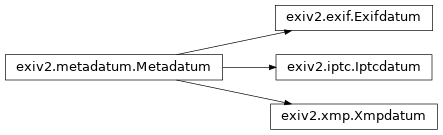
MetadatumAn Exif metadatum, consisting of an ExifKey and a Value and methods to manipulate these.
- copy()
Write value to a data buffer and return the number of bytes written.
The user must ensure that the buffer has enough memory. Otherwise the call results in undefined behaviour.
- Parameters:
buf (writeable bytes-like object) – Data buffer to write to.
byteOrder (
ByteOrder) – Applicable byte order (little or big endian).
- Return type:
- Returns:
Number of characters written.
- count()
Return the number of components in the value
- dataArea()
Return a copy of the data area of the value. The caller owns this copy and
DataBufensures that it will be deleted.Values may have a data area, which can contain additional information besides the actual value. This method is used to access such a data area.
- Return type:
- Returns:
A
DataBufcontaining a copy of the data area or an emptyDataBufif the value does not have a data area assigned or the value is not set.
- familyName()
Return the name of the metadata family (which is also the first part of the key)
- getValue()
Return an auto-pointer to a copy (clone) of the value. The caller owns this copy and the auto-poiner ensures that it will be deleted.
This method is provided for users who need full control over the value. A caller may, e.g., downcast the pointer to the appropriate subclass of Value to make use of the interface of the subclass to set or modify its contents.
- Return type:
- Returns:
An auto-pointer containing a pointer to a copy (clone) of the value, 0 if the value is not set.
- groupName()
Return the name of the metadata group (which is also the second part of the key)
- idx()
Return the index (unique id of this key within the original IFD)
- ifdName()
Return the name of the IFD
- key()
Return the key of the
Exifdatum.
- setDataArea()
Set the data area by copying (cloning) the buffer pointed to by buf.
Values may have a data area, which can contain additional information besides the actual value. This method is used to set such a data area.
- Parameters:
buf (bytes-like object) – Pointer to the source data area
len (int) – Size of the data area
- Return type:
- Returns:
Return -1 if the
Exifdatumdoes not have a value yet or the value has no data area, else 0.
- setValue()
Overload 1:
Set the value. This method copies (clones) the value pointed to by pValue.
Overload 2:
Set the value to the string buf. Uses Value::read(const std::string& buf). If the metadatum does not have a value yet, then one is created. See subclasses for more details. Return 0 if the value was read successfully.
- size()
Return the size of the value in bytes
- sizeDataArea()
Return the size of the data area.
- tag()
Return the tag
- tagDesc()
Return a description for the tag
- tagLabel()
Return a label for the tag
- tagName()
Return the name of the tag (which is also the third part of the key)
- toFloat()
Return the n-th component of the value converted to float. The return value is -1 if the value is not set and the behaviour of the method is undefined if there is no n-th component.
- toInt64()
Return the n-th component of the value converted to int64_t. The return value is -1 if the value is not set and the behaviour of the method is undefined if there is no n-th component.
- toRational()
Return the n-th component of the value converted to Rational. The return value is -1/1 if the value is not set and the behaviour of the method is undefined if there is no n-th component.
- toString()
Return the value as a string.
- typeId()
Return the type id of the value
- typeName()
Return the name of the type
- typeSize()
Return the size in bytes of one component of this type
- value()
Return a constant reference to the value.
This method is provided mostly for convenient and versatile output of the value which can (to some extent) be formatted through standard stream manipulators. Do not attempt to write to the value through this reference. An Error is thrown if the value is not set; as an alternative to catching it, one can use count() to check if there is any data before calling this method.
- Return type:
- Returns:
A constant reference to the value.
- Raises:
Exiv2Errorif the value is not set.
- write()
Write the interpreted value to an output stream, return the stream.
The method takes an optional pointer to a metadata container. Pretty-print functions may use that to refer to other metadata as it is sometimes not sufficient to know only the value of the metadatum that should be interpreted. Thus, it is advisable to always call this method with a pointer to the metadata container if possible.
This functionality is currently only implemented for Exif tags. The pointer is ignored when used to write IPTC datasets or XMP properties.
Without the optional metadata pointer, you do not usually have to use this function; it is used for the implementation of the output operator for
Metadatum, operator<<(std::ostream &os, const Metadatum &md).See also print(), which prints the interpreted value to a string.